Cross-platform design system

Circle Economy design system

Digital product

System

Accessibility

Renderings of the CGR Dashboard landing page and the Norway dashboard as product examples.

Context

Circle Economy Foundation focused on bespoke circularity analyses of nations, cities, and businesses, but aimed to develop platforms and products to scale its impact. Based on project requirements, this often meant developing unique brands and design systems.

Context

Circle Economy Foundation focused on bespoke circularity analyses of nations, cities, and businesses, but aimed to develop platforms and products to scale its impact. Based on project requirements, this often meant developing unique brands and design systems.

Challenge

Create a more consistent user experience and brand recognition, and eliminate high design/development overhead and cross-platform brand fragmentation due to maintaining multiple, isolated, product-specific libraries.

Challenge

Create a more consistent user experience and brand recognition, and eliminate high design/development overhead and cross-platform brand fragmentation due to maintaining multiple, isolated, product-specific libraries.

Solution & Impact

Created a centralized, tokenized, library using a tiered "Core + Local" framework. It was built entirely with responsive variables and WCAG accessibility rules, and bridged the designer-developer workflow resulting in faster production times.

Role

Project lead

Duration

4 months, 2025

Company

Circle Economy Foundation

Team members

Sophia Chou (product design)

Alexandru Grigoras (graphic designer)

Skills

User research

UX/UI

Product management

Accessibility

Design system

Tools

Figma (tokens)

"How might we eliminate brand fragmentation and high maintenance costs caused by multiple, product-specific design systems?"

Inconsistent brand UX

User research revealed that audiences failed to recognize standalone products as part of the parent Circle Economy brand.

Operational inefficiency

Maintaining separate, product-specific UI libraries created massive duplicate workflows for both design and engineering teams.

Scalability bottlenecks

The lack of a centralized, scalable foundation severely hindered the organization's ability to prototype and ship new features rapidly.

How we did it

1

Typography audit

Brand audit: The corporate website had been rebranded a few months earlier, including a new type system. This type system needed to be audited for broader use across products, and adapted if needed.

Live stress-testing: We used the Knowledge Hub revamp to validate the type system and found it had clear limitations. Since the corporate website focused on high level messaging, where Knowledge Hub was an in-depth content platform, the type sizes were often too large and too few to cover the full needs.

Challenge:

We needed to balance rolling out the new type system on Knowledge Hub, while the corporate website still used to the old font system. Since updates to the corporate website were slated in the near future, we reverse-tested the new system back onto the corporate website and created a conversion table between the old and new type systems to assist devs in its application.

Overview of the typography variables and styles in Figma

1

Typography audit

Brand audit: The corporate website had been rebranded a few months earlier, including a new type system. This type system needed to be audited for broader use across products, and adapted if needed.

Live stress-testing: We used the Knowledge Hub revamp to validate the type system and found it had clear limitations. Since the corporate website focused on high level messaging, where Knowledge Hub was an in-depth content platform, the type sizes were often too large and too few to cover the full needs.

Challenge:

We needed to balance rolling out the new type system on Knowledge Hub, while the corporate website still used to the old font system. Since updates to the corporate website were slated in the near future, we reverse-tested the new system back onto the corporate website and created a conversion table between the old and new type systems to assist devs in its application.

Overview of the typography variables and styles in Figma

2

Rebuilding with tokens and variables

Modernized foundations: Shifted the system from rigid Figma styles to structured variables and tokens, creating a system that was easy to apply.

Responsiveness: Baked responsive screen-behavior rules directly into the tokens, working closely with developers to ensure alignment in code production.

An overview in Figma of the button designs plus the right panel open showing variable use.

3

Accessibility

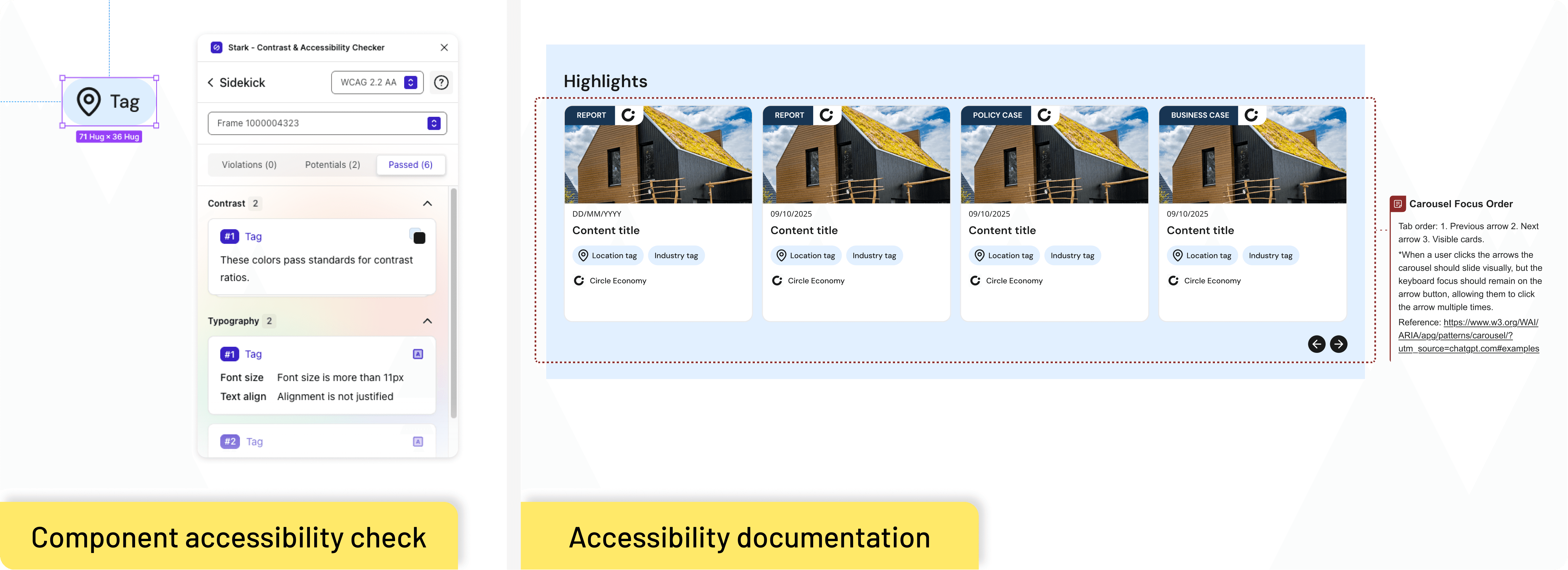
Standardizing compliance: Built all foundational components to natively meet WCAG AA standards, optimizing color contrast, touch targets, and text scaling rules.

Clear documentation: Documented explicit interaction details, including focus rings, tab-order sequences, and component states for developer handovers.

Challenge:

Applying accessibility principles was quite new to the team. By applying them directly at atom and component-level, we made the system inherently more accessible at the core. However, time still needed to be spent educating both designers and devs on their respective accessibility responsibilities. Including the team early in the discussions and creating low-effort procedures helped with the adoption.

Accessibility documentation for a card carousel.

3

Accessibility

Standardizing compliance: Built all foundational components to natively meet WCAG AA standards, optimizing color contrast, touch targets, and text scaling rules.

Clear documentation: Documented explicit interaction details, including focus rings, tab-order sequences, and component states for developer handovers.

Challenge:

Applying accessibility principles was quite new to the team. By applying them directly at atom and component-level, we made the system inherently more accessible at the core. However, time still needed to be spent educating both designers and devs on their respective accessibility responsibilities. Including the team early in the discussions and creating low-effort procedures helped with the adoption.

Accessibility documentation for a card carousel.

4

Tiered library

A big challenge was figuring out how to balance standardization and consistency in the design system and brand, while allowing for new, product specific component creation when needed. Our solution was the following:

Core + local libraries: Established a centralized core library for global tokens and shared components, while allowing individual products to run local design systems built from nested core instances.

Component promotion: Created a pipeline where product-specific patterns (like Knowledge Hub content cards) were "promoted" to the core library once recognized as valuable to the wider ecosystem.

An overview showing how a small component of a menu bar in the core design system is used to build a larger navigation menu for Knowledge Hub.

4

Tiered library

A big challenge was figuring out how to balance standardization and consistency in the design system and brand, while allowing for new, product specific component creation when needed. Our solution was the following:

Core + local libraries: Established a centralized core library for global tokens and shared components, while allowing individual products to run local design systems built from nested core instances.

Component promotion: Created a pipeline where product-specific patterns (like Knowledge Hub content cards) were "promoted" to the core library once recognized as valuable to the wider ecosystem.

An overview showing how a small component of a menu bar in the core design system is used to build a larger navigation menu for Knowledge Hub.

What we delivered

Structured flexibility

We were working on this design system alongside the rebuild of the Knowledge Hub and Circle Economy websites, which gave us good practice to stress test this system. In the end we created a design system that was living — something that had a strong enough base, but was flexible enough to grow and apply to any future product in the ecosystem. Furthermore, it was something that both designers and developers were able to use and refer to with much more ease than before.
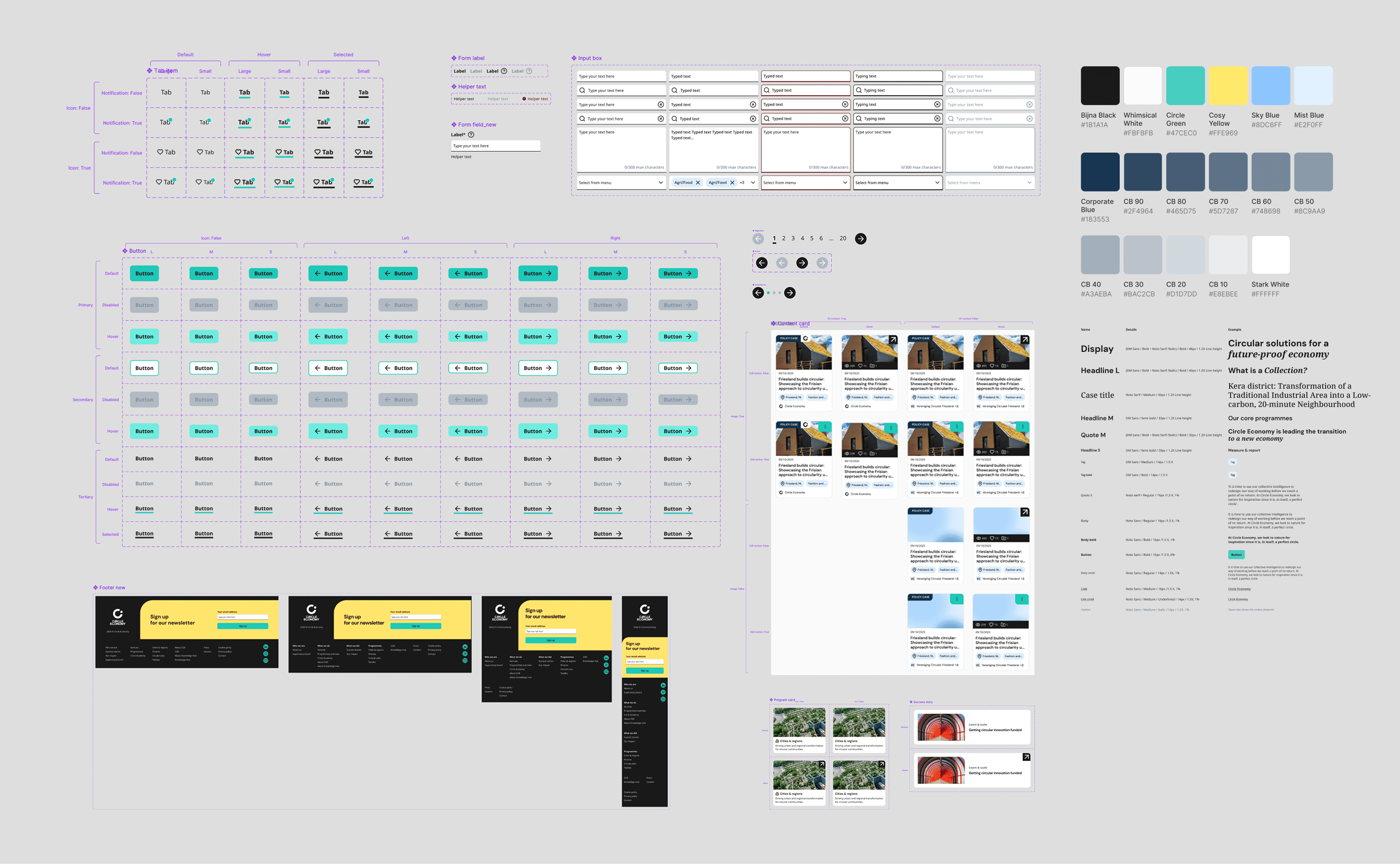
A screencapture showcaseing many different elements from the design system.

Were the challenges met?

Inconsistent brand UX

Created one, still adaptable, visual system to be rolled out across the full ecosystem of products.

Operational inefficiency

Simplified the workflow by giving designers and devs one design system to refer to and maintain.

Scalability bottlenecks

Baked-in branding and responsivity allowed designers to create mockups more swiftly.

Reflections

My role: Led the foundational architecture of the design system. Educated the internal team on variables and tokens, defined cross-device parameters, and set up the library governance workflow so the team could safely scale it.

What went well

  • Designer and developer collaboration: I organized frequent conversations between designers and developers throughout the process, to ensure alignment on our way of working as well as how the system translated to the codebase.

  • Time savings: Eliminating manual device resizing allowed the team to deliver rock-solid, multi-breakpoint mockups that previously had to be forfeited due to time constraints.

What could be better

  • Measuring the impact: While qualitative feedback from the team was overwhelmingly positive, I would have liked to implement a "time-to-market" tracking system to precisely measure how much faster designers and developers can ship a feature compared to our previous way of working.

What could be better

  • Measuring the impact: While qualitative feedback from the team was overwhelmingly positive, I would have liked to implement a "time-to-market" tracking system to precisely measure how much faster designers and developers can ship a feature compared to our previous way of working.